Void void check image: A Quick Guide to Direct Deposit
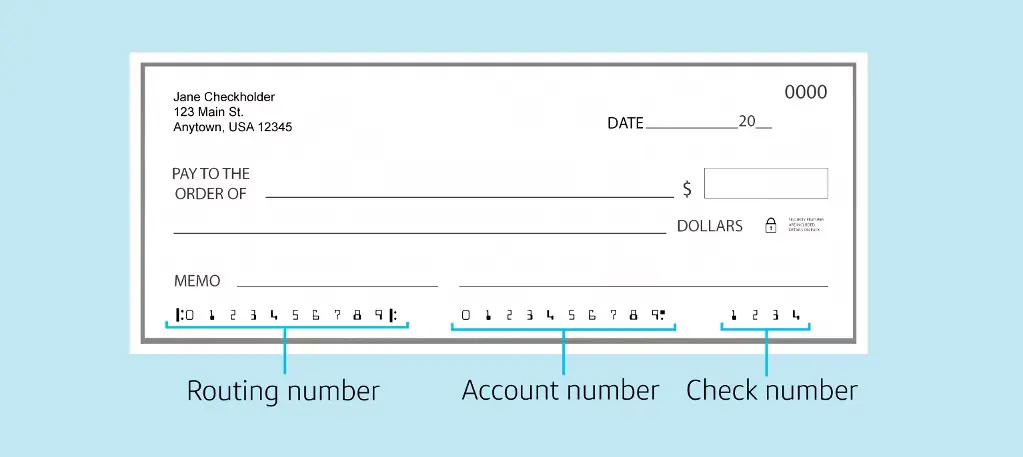
So, what exactly is a void check image? Think of it as a digital snapshot of a regular paper check, but with one crucial difference: the word "VOID" is written clearly across the front. The whole point is to share your banking details—like your routing and account numbers—without anyone being able to actually cash the check. It's a simple, secure way to give companies the info they need for things like direct deposit.
Why You Need a Void Check Image

Even with all the digital banking tools we have today, the old-school voided check is still the gold standard for verifying an account. Payroll departments, mortgage lenders, and other companies trust it for a simple reason: it's incredibly accurate. A check image is a direct, verified link to your account, with all the necessary numbers printed in a standard format that machines can easily recognize.
You'll probably find yourself needing to submit a void check image for a few common financial tasks:
- Setting up direct deposit for your job: This is the big one. Your employer has to be 100% sure they're sending your hard-earned money to the right place.
- Arranging automatic bill payments: Many landlords, utility providers, or subscription services will ask for one to set up automatic ACH withdrawals from your account.
- Linking bank accounts: If you're connecting a new checking account to a financial app or an investment platform, they often use a voided check to confirm you actually own the account.
The Shift From Paper to Digital
It wasn't that long ago that you'd just hand a physical, voided paper check to your HR manager and be done with it. Now, that entire process has pretty much moved online. Companies expect a digital copy—a clean scan or a clear photo—that you can upload to a secure online portal. While this is certainly more convenient, it also brings a new set of rules about image quality and file formatting.
From my experience, the number one reason direct deposit setups get delayed isn't wrong information. It's a bad image. A blurry, dark, or poorly cropped photo of a voided check will almost always get rejected.
This guide is here to help you create a perfect void check image that gets approved the first time you submit it. We’ll walk through the best ways to capture the image and cover the specific formatting details that payroll and banking systems require. Getting this small document right from the start ensures your financial setups go smoothly and without any frustrating delays.
Proven Methods for Creating Your Void Check Image

You don't need to be a tech wizard or have fancy equipment to create a perfect void check image. In just a few minutes, you can produce a professional-looking document that any HR department or bank will accept.
Let's walk through three solid methods. Each one has its place, and the best one for you really just depends on what you have on hand.
Method 1: Photographing a Physical Check
If you’ve got a checkbook lying around, this is the classic approach. It sounds simple, but getting it right is more than just snapping a quick picture.
First things first, prep the check. Grab a dark pen and write "VOID" in big, clear letters across the front. The key is to make it obvious the check can't be used, but without covering up the routing and account numbers at the bottom. Those numbers are the whole point, so they have to be perfectly readable.
Now, let's talk about the photo itself. Find a spot with good, even lighting. Natural light from a window is your best friend here, as it kills shadows. Whatever you do, avoid using your phone's flash—it almost always creates a nasty glare right over the numbers you're trying to capture.
Lay the check down on a flat, plain surface that contrasts with the check itself, like a dark wood table. Hold your phone directly over it, making sure it’s parallel to avoid any weird angles or distortion. Tap the screen to focus on that line of numbers at the bottom, then snap the shot. Take a second to review it—is it blurry? Are there shadows? If you can’t read it easily, your payroll department won’t be able to either.
Method 2: Scanning for a Professional Finish
For a truly clean and professional-looking result, you can't beat a scanner. It produces a crisp, flat image that automated payroll systems can read without a hitch. This could be a flatbed scanner on your all-in-one printer or even a scanning app on your phone.
Using a flatbed scanner is straightforward. Place the voided check face-down on the glass and look for the resolution setting. You'll want to set it to 300 DPI (dots per inch). That's the gold standard for document scanning—clear enough for any system, but not so large that the file is a pain to email.
Save the final image as a PDF or JPG, as pretty much every company on earth accepts those formats.
Don't have a big scanner? No problem. Mobile apps like Adobe Scan or even the built-in scanner in your phone's Notes app are fantastic alternatives. They do more than just take a picture; they automatically crop, correct for perspective, and boost the contrast to give you a result that looks just like a real scan.
A high-quality scan leaves no room for error. It presents your banking details in a clean, machine-readable format that can genuinely speed up the direct deposit setup process by avoiding manual entry mistakes on the other end.
This isn't just about convenience; it's about security. The technology behind verifying these documents is part of a massive image recognition industry valued at USD 50.36 billion. This sector is exploding with AI-driven tools designed to combat the ever-present threat of check fraud.
Method 3: Using a Digital Check Generator
What happens when you don't have a physical checkbook? It’s a common situation these days, but you're not stuck. Digital solutions have stepped in to fill the gap.
Online voided check generators are built for this exact scenario. You securely enter your banking details—your routing and account numbers, plus your name and address just as they appear on your bank statements. The tool then generates a perfectly formatted void check image for you to download.
Security is paramount here. Only use a service that uses SSL encryption (look for the little lock icon in your browser's address bar) and has a transparent privacy policy that clearly states your financial data isn't stored. For example, a tool like our online check generator lets you create a compliant document in under a minute without needing to order or find a paper check.
This route is a lifesaver for anyone who does all their banking online and needs to provide a voided check for a new job or to set up an automatic bill payment.
Comparing Void Check Image Creation Methods
Choosing the right method comes down to your specific needs—what you have available, how quickly you need it, and the quality you're aiming for. This table breaks down the three options to help you decide.
| Method | Best For | Pros | Cons |
|---|---|---|---|
| Photograph | Quick, on-the-go needs when you have a physical checkbook. | No special equipment needed beyond a smartphone; instant. | Prone to shadows, glare, and distortion; quality can vary. |
| Scanner | Achieving the most professional, high-quality, and error-free result. | Produces a clean, flat, and universally accepted image; best for automated systems. | Requires a scanner or a good scanning app; takes a bit more effort. |
| Digital Generator | People without a physical checkbook or those who need a check instantly. | Fast, convenient, and produces a perfectly formatted document every time. | Requires trusting a third-party service with your banking information. |
Ultimately, any of these methods will get the job done. The key is to focus on creating a final image that is clear, legible, and contains all the necessary information. A little attention to detail now can save you from a delayed paycheck later.
Getting Your Image Format Right for Guaranteed Acceptance

Taking a clear picture is a great start, but getting the formatting right is what truly seals the deal. I’ve seen countless rejections happen simply because the file wasn’t in a format the company’s HR or payroll system could read. Many of these submission portals use automated filters, and an incompatible file gets kicked out before a human ever lays eyes on it.
This is where a little technical prep goes a long way. The most common pitfall I see is people submitting HEIC files straight from their iPhones. While it’s the default for Apple, most corporate systems haven’t caught up.
To avoid this, stick to one of these three universal formats:
- JPG (or JPEG): This is the workhorse for digital photos. It strikes the perfect balance between image quality and a manageable file size, making it ideal for most online uploads.
- PNG: If you're working with a digitally generated check or want to ensure the text is razor-sharp, PNG is your best bet. It excels at keeping numbers and letters crisp.
- PDF: When in doubt, go with PDF. It’s the gold standard for documents for a reason—it’s universally accepted and locks in the formatting, so what you see is what they see.
Nailing the Technical Specs
Once you've chosen the right file type, there are a couple of other details to check. A file that's too large can time out during an upload, while one with poor resolution will be completely unreadable.
You’re aiming for a resolution of 300 DPI (dots per inch). This has long been the standard for professional document scanning and guarantees that every digit on your check is perfectly legible.
For file size, a good rule of thumb is to stay under 2MB. If your image is larger, don't worry. Nearly every photo editing tool out there, including the one built into your smartphone, can easily resize it for you.
Here's the most important takeaway: your voided check image has to be perfectly flat, evenly lit, and in sharp focus. Any blurriness, weird angles, or shadows covering the MICR line at the bottom (that's the line with your routing and account numbers) will get it instantly flagged by an automated system.
Getting this right is more critical than you might think. The market for fake image detection, currently valued at USD 1.42 billion, is built on sophisticated systems that analyze documents like yours. These platforms deliver an authenticity score in milliseconds, so a clean, properly formatted image is your ticket to a smooth, automated approval.
One Last Look Before You Send
Before you click that "submit" button, do a final review.
First, is it cropped correctly? The image should feature the check and only the check. Get rid of any distracting background like your kitchen counter or desk. Make sure all four corners are visible.
Next, check the orientation. It sounds simple, but you’d be surprised how many images get submitted sideways or upside-down, which can cause an immediate processing error. A quick double-check can save you from the headache of a delayed paycheck. You can also explore our guides on specific bank requirements to see if your institution has any unique preferences.
How to Securely Submit Your Void Check Image

You’ve got a perfectly formatted void check image. Now for the most critical part: getting it to HR or your bank without exposing your sensitive info. This file has your routing and account numbers on it—the literal keys to your bank account. Sending it carelessly is like leaving your wallet open on a public bench.
The biggest mistake I see people make is simply attaching the image to a regular email and hitting "send." Standard email isn't encrypted from end to end, which means it’s vulnerable as it hops across different networks. It's basically the digital equivalent of sending a postcard; anyone handling it along the way could easily read it.
It’s just as risky to send financial documents through text messages or social media DMs. These platforms are frequent targets for hackers and simply weren't built for secure document sharing.
The Safest Submission Methods
So, how should you send it? Your main goal is to use a method that encrypts your data from the moment it leaves your device until the moment the right person opens it.
By far, the best option is a dedicated company portal. Most employers use a secure Human Resources Information System (HRIS) or a payroll platform for exactly this reason. When you upload a document there, it's shielded by multiple layers of security designed to protect sensitive employee data.
If a direct upload isn't an option, a secure file-sharing service that provides end-to-end encryption is your next best bet. Look for services that let you protect the link with a password or set it to expire after a certain amount of time.
Never just assume a submission method is secure. If your new company asks you to email your void check, it’s perfectly acceptable to ask, "Is there a secure portal I can use instead?" It’s a reasonable question that shows you’re responsible and helps protect you from potential identity theft.
A Quick Security Checklist
Before you hit "submit," run through this quick mental checklist to make sure your financial information stays private.
- Confirm the Recipient: This sounds obvious, but you’d be surprised. Double-check the email address or the portal you’re uploading to. One small typo could send your banking details to a complete stranger.
- Use a Secure Network: Never, ever submit sensitive documents while on public Wi-Fi at a coffee shop, airport, or hotel. These networks are notoriously insecure and a playground for data thieves.
- Delete After Confirmation: Once HR or payroll confirms your direct deposit is all set up, do a little housekeeping. Delete the image file from your computer's downloads folder, your phone's photo gallery, and your "sent" email folder.
- Look for the Lock: When using any web portal, always glance at your browser's address bar. The little padlock icon isn't just for decoration—it confirms the site is using SSL/TLS encryption to protect your connection.
Troubleshooting Common Rejection Issues
It’s a special kind of frustration to get that rejection email after you’ve carefully submitted your voided check. The good news? Most rejections come down to just a handful of common, easy-to-fix mistakes. Before you get stuck in a back-and-forth email chain with HR, you can probably diagnose and solve the problem yourself.
Often, the culprit is as simple as a blurry photo. Even the slightest bit of motion blur can make the crucial routing and account numbers at the bottom of the check impossible for automated systems to read. If your image got flagged for poor quality, your very first step should be to retake it.
Find a flat, dark surface and a room with plenty of natural light. Hold your phone directly over the check to avoid weird angles, and be sure to tap the screen to focus right on that line of numbers. And whatever you do, turn off your camera’s flash—it’s the number one cause of rejection-inducing glare.
Decoding Rejection Reasons
Sometimes the rejection message itself offers a clue. If you see phrases like "unreadable characters" or "OCR failure," that's a direct signal that their system's Optical Character Recognition (OCR) software couldn't make sense of the image. This usually points back to blurriness, shadows, or even writing "VOID" directly over those important numbers.
Here are the most common snags and how to get past them:
The Problem: The File Size Is Too Large
- The Fix: Many payroll portals have a surprisingly small file size limit, often around 2-5 MB. Before you re-upload, use a free online image compressor or your phone’s built-in photo editor to shrink it down. Aim for a JPG file under 2MB to be safe.
The Problem: The Image Is Skewed or Cropped Incorrectly
- The Fix: Make sure all four corners of the check are visible in the picture and that it’s perfectly straight. A photo that's taken at an angle or crops off even a tiny part of the check is almost guaranteed to be kicked back.
When the Image Is Not the Problem
But what if you’ve taken a perfect, crystal-clear photo and it still gets rejected? The issue might be a fraud detection system working a little too well. Banks and payroll companies are on high alert for altered documents, which makes sense when you consider that U.S. check fraud losses have soared past $28 billion. This has kicked off a huge demand for fake image detection technology, a market expected to hit USD 4.9 billion by 2030 as companies scramble to protect the more than 10 billion direct deposit transactions made each year. You can get more details on this tech over at MarkNtel Advisors.
If you used an online generator and got a rejection, go back and double-check that the name and address you entered match your bank records exactly. A tiny difference, like using "St." instead of "Street," can be enough to trigger a mismatch in their verification system.
In the end, persistence and a sharp eye for detail are what matter most. Start by fixing the most common visual flaws—focus, lighting, and cropping. If that doesn't clear the hurdle, confirm that every piece of information on the check perfectly matches what your bank has on file. This systematic approach will solve almost any rejection issue and get your direct deposit set up without any more delays.
Common Questions About Voided Checks
Even when you know the steps, a few tricky questions always seem to come up. Nailing these final details can save you from a frustrating back-and-forth with HR or your bank. Let’s clear up some of the most common hangups people run into.
Can I Just Use a Deposit Slip Instead?
It seems like it should work, right? Unfortunately, in most cases, a deposit slip won't cut it.
While a handful of companies might accept one, the standard is a voided check for a very good reason: fraud prevention. A check has your name and address pre-printed on it, offering an extra layer of verification that a generic deposit slip just doesn't have. This helps the payroll or billing department confirm the account actually belongs to you.
To avoid delays and get your direct deposit or automatic payments set up correctly the first time, always stick with a voided check image. Unless you’ve been explicitly told a deposit slip is okay, don't risk it.
Handing over a voided check gives the payroll department exactly what their system expects. It removes any guesswork on their end, which means a faster and more accurate setup for you.
What if I Don’t Have a Checkbook?
You're not alone. In an age of debit cards and digital payments, physical checkbooks are becoming a relic. The good news is you don't need to order a whole box of checks just for this.
Your bank almost certainly has a solution waiting for you. Here are your best options:
- Download a Pre-filled Direct Deposit Form: Log into your online banking portal and look for an option to generate a direct deposit form. This is usually the quickest and most professional route. It’s an official PDF from your bank that lists all the critical info: your name, routing number, and account number. Many even include a handy pre-voided check graphic.
- Get an Official Bank Letter: If you can't find a direct deposit form, your bank can provide an official letter on their letterhead confirming your account details. You can usually request this through their customer service chat or by visiting a branch.
Worst-case scenario? Pop into a local branch and ask the teller for a "counter check." They can print a single, blank check for you on the spot. Then you can just void it, snap a picture, and you're good to go.
What's the Right Way to Write "VOID" on a Check?
How you write "VOID" actually matters more than you’d think. Grab a pen with dark ink—black or blue works best—and write the word in big, clear capital letters across the face of the check.
The idea is to make the check impossible to use as a payment. Your writing should cross over the main payment areas:
- The "Pay to the order of" line
- The dollar amount box
- The signature line
Here’s the critical part: Do not write over the routing and account numbers at the bottom. That string of numbers is the MICR line, and it needs to be perfectly clear and readable for automated systems to process it. A single pen stroke through those numbers is the number one reason voided checks get rejected.
Think of it this way: disable the payment part of the check, but keep the identification part pristine.
Stop waiting for a checkbook to arrive in the mail. VoidedCheck.org lets you create a professional, compliant void check image securely in under 60 seconds. Get the document you need for direct deposit or automatic payments instantly at https://voidedcheck.org.
Related Articles

Generate Check Online: Create a Check in Seconds (generate check online)
Need to generate check online? Learn a fast, secure way to create a check for direct deposit or bill pay with our step-by-step guide.

How to create voided check online Instantly
Learn how to create voided check online for direct deposits or ACH payments. Our secure, step-by-step guide makes it fast and easy.

A Practical example of voided check: how to void and set up payments
Looking for an example of voided check? This step-by-step guide shows how to void a check correctly and offers safe, modern direct deposit alternatives.