


Over 10,000 checks generated
Voided Check Generator
A Voided Check Generator That Works in Seconds
Our voided check generator lets you create a professional, bank-verified voided check online without ordering a checkbook or visiting a branch. Enter your bank, routing number, and account number, and the tool builds a clean, correctly formatted voided check you can download as a PDF or image in under a minute.
A voided check is often required to set up direct deposit, automatic bill payments, or ACH transfers, because it confirms your account and routing numbers for whoever is paying you. Instead of tearing a check out of a book and writing "VOID" across it, you can use this online voided check generator to produce one instantly, from any device, whenever you need it.
Where to Find Your Numbers
Your routing and account numbers are printed at the bottom of every check in a special MICR font. Here's exactly where to find them:
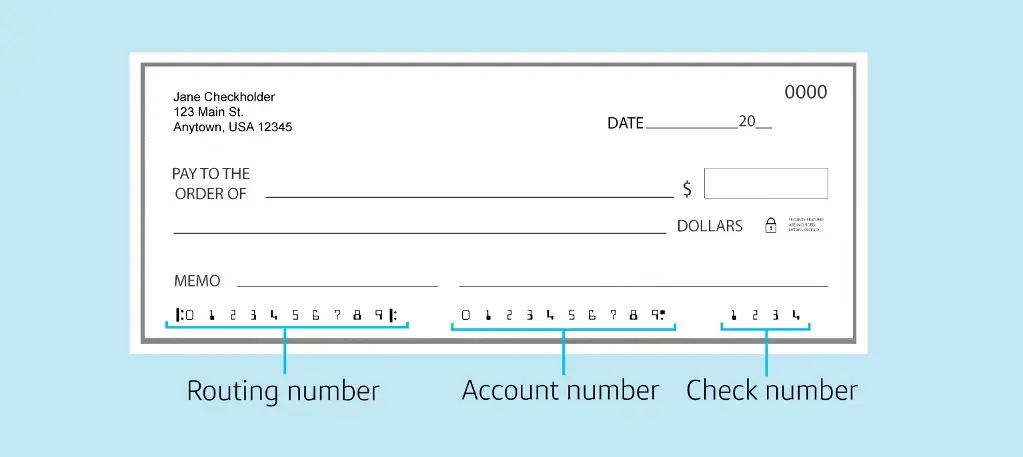
Routing Number
The 9-digit number that identifies your bank. Every check from the same bank has the same routing number.
Account Number
Your unique account number (up to 17 digits) that identifies your specific checking account at the bank.
Quick Tip
Don't have a physical check? You can also find these numbers in your online banking portal, mobile banking app, or by calling your bank. The routing number is always 9 digits, while your account number can be anywhere from 5 to 17 digits long.
Setting up direct deposit? You will usually need a direct deposit form as well as the voided check. Ours is free.
Free direct deposit formHow Our Voided Check Generator Works
Creating a voided check online has never been easier. Our generator uses verified US Federal Reserve banking data to ensure your check includes the correct routing number and formatting. Here's what makes our voided check generator different:
Instant Generation
Enter your banking information and receive your voided check via email in 60 seconds or less. No waiting, no appointments, no hassle.
Bank-Verified Data
Our voided check generator connects to federal banking databases to validate routing numbers and ensure accuracy. This means fewer errors and faster approval when you submit your check.
Professional Format
Every voided check created through our generator meets the formatting standards used by major payroll processors, HR departments, and financial institutions across the country.
Secure Processing
Your banking information is encrypted during generation and automatically deleted within 24 hours. We never store your account details permanently.
When You Need a Voided Check Generator
Most people search for a voided check generator when they need to set up direct deposit but don't have paper checks available. Our generator solves this problem instantly. Common situations include:
Starting a new job and your employer requires a voided check for payroll setup. HR departments typically need this within your first week, and our generator delivers it immediately.
Setting up automatic bill payments for your mortgage, rent, or utilities. Payment processors need your banking information in the exact format that a voided check provides.
Linking investment accounts or setting up recurring transfers between banks. Financial institutions often require a voided check to verify account ownership before processing transactions.
Receiving tax refunds via direct deposit from the IRS or state agencies. A voided check speeds up the refund process by providing accurate banking details.
Why Use an Online Voided Check Generator
Traditional methods of getting a voided check can be time-consuming and expensive. Here's why thousands of people choose our voided check generator instead:
Save Time
Visiting a bank branch can take an hour or more when you factor in travel time and waiting. Our voided check generator works instantly from any device with internet access.
Avoid Unnecessary Costs
Banks often charge $20 to $40 for a book of checks when you only need one voided check. Our generator gives you exactly what you need without the waste.
No Account Minimums
Some banks require you to maintain minimum balances or pay monthly fees to order checks. Our voided check generator has no such requirements.
Works With Any Bank
Our generator supports over 4,300 US banks and credit unions. Whether you bank with a major institution like Chase or Wells Fargo, or a small local credit union, our system works with your account.
What You'll Receive
When you use our voided check generator, you get a professionally formatted file that includes:
- Your name and address as it appears on your bank account
- Your bank's routing number (validated against federal banking records)
- Your account number in the correct position
- The word "VOID" prominently displayed to prevent fraudulent use
- Standard MICR formatting that matches traditional printed checks
The voided check you receive from our generator is accepted by the same institutions that accept traditional paper voided checks. We've designed our system to match the exact specifications used by professional check printing companies.
Types of Voided Checks
The generator above works for any US bank. If you need a specific format, start here.
Helpful Resources
VoidedCheck.org vs. Traditional Methods
Save time and hassle with our instant digital solution
Bank Visit
- ✗60+ minute wait time
- ✗Limited branch hours
- ✗Travel required
- ✗May require appointment
Order Checkbook
- ✗5-10 day shipping
- ✗Pay for entire checkbook
- ✗Waste unused checks
- ✗Storage clutter
VoidedCheck.org
- ✓60 second generation
- ✓Available 24/7
- ✓Instant digital delivery
- ✓Pay only for what you need