
Your Guide to an ACH Payment Authorization Form
An ACH payment authorization form is essentially the handshake that kicks off an electronic payment relationship. It’s the signed agreement that gives a business your explicit permission to pull money from or send money to your bank account.
Think of it as the legal document at the heart of direct deposits for your paycheck or those automatic monthly payments for your gym membership. This form is the bedrock for most recurring electronic transactions we rely on every day.
What Is an ACH Payment Authorization Form, Really?
At its core, an ACH authorization is the formal permission slip that keeps modern financial life running smoothly. It’s a binding agreement that sets clear expectations between you and a company, whether you're paying a bill or getting paid yourself. This document is crucial for both one-time and recurring payments processed through the Automated Clearing House (ACH) network.
This simple yet powerful form is the engine behind countless daily transactions. It’s what you fill out when you:
- Set up direct deposit: This is you telling your employer, "Yes, you can send my salary directly into my bank account."
- Automate your bills: It’s how you authorize your utility company, landlord, or Netflix to pull funds on a set schedule. No more missed payments.
- Pay for a one-off service: This gives a business one-time permission to debit your account for a specific purchase you've made.
It's More Than Just a Form
An ACH authorization is much more than just a piece of paper or a digital screen with checkboxes. It’s a critical compliance and security tool. By signing it, you're confirming that you understand and agree to the payment terms—the amount, the frequency, and how long the agreement lasts.
For businesses, this document is absolutely non-negotiable. It serves as proof of consent, which is a core requirement from Nacha (National Automated Clearing House Association), the organization that governs the ACH network. Having this on file protects them from disputes and chargebacks, since they have a clear record of your approval.
This form is your safeguard. It ensures that a company can only access your funds under the exact terms you’ve agreed to, preventing unauthorized transactions and giving you a clear path for resolving any potential disputes.
To make sure everything is in order, let's quickly break down the essential pieces of information that every ACH authorization form needs to include.
Key Components of an ACH Authorization Form
This table summarizes the must-have information for a compliant and effective ACH authorization form. Leaving any of these out can lead to payment failures or compliance issues down the road.
| Component | Purpose | Example |
|---|---|---|
| Payer's Information | Identifies the individual or company authorizing the payment. | John Doe, 123 Main Street, Anytown, USA |
| Financial Institution Details | Specifies the bank and account to be debited or credited. | Bank of America, Routing: 021000322, Acct: 123456789 |
| Transaction Type | Clarifies if the authorization is for a one-time or recurring payment. | "Recurring monthly debit" |
| Payment Amount & Frequency | States the exact amount (or a range) and how often it will be processed. | "$49.99 on the 1st of every month" |
| Authorization Statement | The legal language where the payer explicitly grants permission. | "I authorize [Company Name] to debit the account..." |
| Signature & Date | The final confirmation that the payer agrees to the terms. | John Doe's Signature, October 26, 2023 |
Having a complete and accurate form is the first step to a smooth and secure ACH payment process for everyone involved.
Fueling the Shift From Paper to Pixels
The widespread adoption of ACH authorizations was a massive catalyst in the financial world's move away from paper checks. This shift has made transactions dramatically more efficient and secure. Back in 2008, ACH transaction volume at the Federal Reserve officially surpassed check volume for the first time, hitting 10 billion transactions. That momentum just kept building, growing to 18.5 billion by 2022. You can dig into the specifics by exploring the Federal Reserve's history of the ACH network.
A common step in this process involves attaching a voided check to the form. It's a tried-and-true way for the company to verify your banking details are correct. If you don't have a checkbook handy, you might want to check out our guide on how to get a voided check.
Getting to Know the Key Fields on an ACH Form
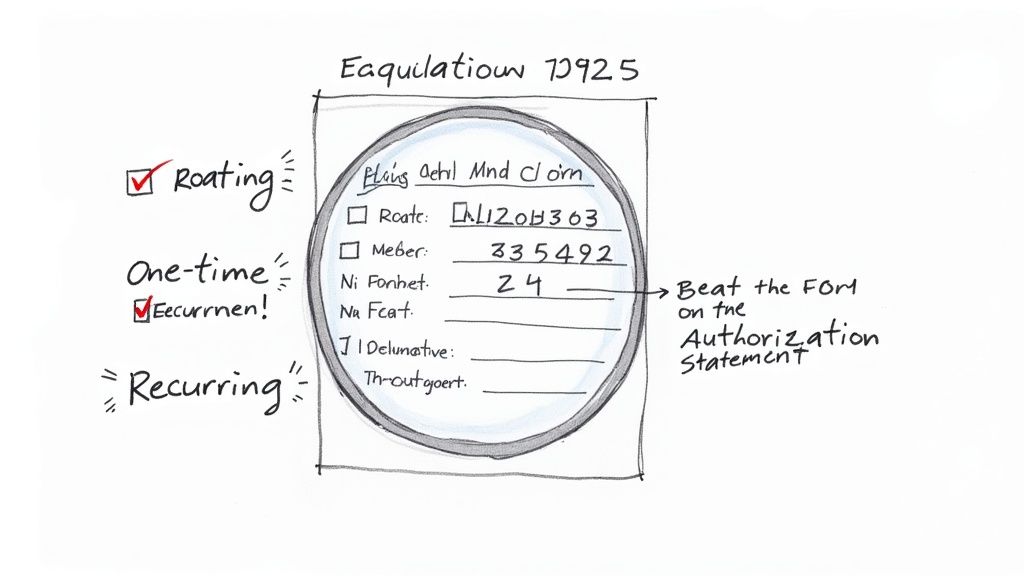
At first glance, an ACH authorization form can look like just another piece of administrative paperwork. But every single field is there for a reason—to make sure your money goes to the right place, at the right time, with your full permission.
Let's walk through what you're actually filling out and why each part is so important.
The two non-negotiable pieces of information are your bank routing number and your account number. I always tell people to think of the routing number as your bank’s address and the account number as your specific mailbox. You need both for the payment to land correctly.
Where to Find Your Bank Details
The classic way to find these numbers is by looking at the bottom of a paper check. The nine-digit number on the far left is the routing number. The string of digits right next to it is your account number.
Don't have a checkbook handy? No problem. You can almost always find these details by logging into your online banking portal or mobile app. Just look for a section called "Account Details" or something similar.
For years, the gold standard for verification was taping a voided check to the form. While that still works, digital methods are becoming much more common. If you need a digital copy fast, you can even use a tool like a voided check generator to create an image without needing a physical check.
A Quick Tip From Experience: Before you submit that form, check those numbers one more time. Seriously. A single typo is the number one reason I see ACH transactions fail. That tiny mistake can cause payment delays and sometimes even a returned item fee from your bank.
Making Sense of the Authorization Statement
After the numbers, you'll find the authorization statement. This isn't just legal boilerplate; it's the heart of the agreement. This is the section where you are giving explicit, legally binding permission for the transaction.
A proper authorization statement will clearly spell out:
- The Payee: Who, exactly, are you giving permission to? It should name the specific business, like "XYZ Gym" or "ABC Payroll Services."
- Transaction Type: Is this a one-and-done payment or are you setting up recurring debits? The form must specify.
- Payment Amount: For recurring payments, it should state the exact amount (e.g., "$50.00") or define a range if it varies (e.g., "not to exceed $100.00").
- Frequency and Duration: How often will the payment happen? It should be specific, like "monthly on the 5th," and mention the start date.
This clarity protects everyone involved. It creates a clear record of the agreement, so there are no surprises on either side of the transaction.
The security and reliability built into the ACH authorization process are a huge reason why electronic payments have exploded. In 2023 alone, the ACH network handled a staggering 31.5 billion payments, totaling $80.1 trillion. That massive volume is built on the trust these simple forms create.
How to Handle Bank Information Securely
When you're filling out an ACH authorization, you're handling sensitive bank details, so a little caution goes a long way. The ACH network itself is incredibly secure, but how your information gets from you to the processor is just as important. The main goal is simple: get your account and routing numbers verified correctly without putting them at risk.
For decades, the go-to method was the humble voided check. It's a tried-and-true way to provide banking information that confirms you own the account, but it can't be cashed or used fraudulently.
Using a Voided Check for Verification
If you need to void a check, it's easy. Just grab a pen and write "VOID" in big, bold letters across the face of the check. Make sure your writing covers the payee line, the amount box, and especially the signature line. Whatever you do, don't sign a check you're voiding.
That one word instantly turns a negotiable check into a secure piece of paper containing just the facts: your name, address, and those all-important account and routing numbers. This is why so many employers still ask for one when setting up direct deposit.
But let's be honest, paper checks are fading out. Even government agencies like USCIS are planning to phase them out by late 2025. This shift is pushing digital verification methods to the forefront as the new, more secure standard.
Modern Digital Verification Methods
Today, we have much faster and safer digital options that are making the voided check obsolete. These methods can confirm your bank details in seconds, often without you ever having to manually type out your account numbers and send them over an insecure channel like email.
Here are a couple of the most popular digital approaches:
- Third-Party Platforms: Services like Plaid or Finicity have become the industry standard. They act as a secure go-between. You use their encrypted portal to log into your online banking, which instantly authenticates your account for the company requesting payment. The best part? The company never sees or stores your banking login credentials.
- Micro-Deposits: This is another classic online verification trick. The company will send two small, random deposits (we're talking a few pennies) to your bank account. To prove you own the account, you simply log in, see the amounts, and report them back to the company.
Here's a critical piece of advice from my experience: Never send a picture of a check or type your account numbers into a standard email. Email is not encrypted, and it’s a goldmine for fraudsters looking to intercept sensitive data. Always use a secure portal or one of the official verification methods a business provides.
Spotting Red Flags and Scams
When you're asked to authorize an ACH payment online, stay sharp. Scammers are clever and often create convincing look-alike forms or websites to phish for your banking information. Before entering anything, always double-check the URL to ensure it starts with "https://" and belongs to the company you're actually dealing with.
Be especially wary of unsolicited emails asking you to "update" your payment details by clicking a link. If you get one, don't click anything. Instead, go directly to the company's official website or call a phone number you know is legitimate to ask if the request is real. A few minutes of verification can save you from a major headache.
Crafting a Compliant ACH Form for Your Business
If your business is going to collect payments via the ACH network, grabbing a generic template off the internet just won't cut it. You have to create your own ach payment authorization form, and it needs to follow some very specific rules set by Nacha. Getting this form right is your first line of defense against disputes and is essential for keeping payments flowing smoothly.
Think of this authorization form as a clear-cut contract between you and your customer or employee. It needs to be unambiguous and contain all the legally required pieces. A properly built form not only protects your business but also builds trust from the very first transaction.
The Non-Negotiables for a Nacha-Compliant Form
To keep your operations above board and fully compliant with Nacha regulations, every single authorization form must have a few key elements. These details are there to make sure the person giving you their bank information knows exactly what they're agreeing to.
Make sure your form explicitly states:
- Direct Authorization Language: You need a sentence that leaves no room for interpretation. Something like, "I authorize [Your Company Name] to debit the bank account provided below..." is perfect.
- Payment Specifics: Is this a one-time charge or a recurring payment? For recurring debits, you have to spell out the timing (monthly, weekly, etc.) and the amount. If the amount varies, you must state how the amount will be determined or provide a "not to exceed" figure.
- Who's Who: Always include the full name of the person or company authorizing the payment, along with your own business’s legal name.
Skipping any of these components can render the authorization invalid. In my experience, this is the most common reason businesses face preventable chargebacks and compliance headaches. Precision here is everything.
The Right to Say "Stop"
Here's something that's easy to miss but incredibly important: you must provide clear, simple instructions for how someone can cancel their authorization. It's a fundamental consumer right, and your form has to explain the process.
Your ach payment authorization form isn't complete without a section detailing how to revoke consent. It can be straightforward, like: "To cancel this authorization, please contact us in writing at [Your Email Address] at least 3 business days before the next scheduled payment."
This kind of transparency is a cornerstone of Nacha's rules. It empowers the payer and shows that your business is operating in good faith. Trust me, failing to include this can lead to some serious compliance penalties down the road.
Checklist for a Nacha-Compliant ACH Authorization Form
Before you put your form into circulation, run through this final checklist. It’s a simple way to double-check that you’ve covered all the essential bases to protect your business and meet Nacha’s standards.
| Compliance Item | Included? (Yes/No) | Why It's Important |
|---|---|---|
| Clear Authorization Statement | Confirms explicit consent from the payer for the transaction. | |
| Payment Amount & Frequency | Sets clear expectations and prevents disputes over incorrect charges. | |
| Revocation Instructions | Fulfills a key consumer right and Nacha compliance requirement. | |
| Company & Payer Names | Identifies the parties involved in the legal agreement. | |
| Secure Record Retention Plan | Nacha requires you to store authorizations for 2 years after they end. |
Think of this table as your final quality-control check. If you can confidently mark "Yes" for each item, you're well on your way to a smooth and compliant ACH payment process.
What Happens After the Form Is Signed?
An ACH payment authorization form isn't a "sign it and forget it" document. The real work begins after you get that signature. Managing the lifecycle of these authorizations—from secure storage all the way through to handling cancellations—is just as crucial as getting the initial details right. Doing this properly keeps you compliant and, just as importantly, keeps the trust of your customers or employees.
A question I get asked all the time is about electronic signatures. Are they legit? Absolutely. Thanks to the federal E-SIGN Act, an e-signature is just as legally binding as one signed with pen and ink. As long as your digital process clearly shows the person intended to sign, you're golden.
Storing and Holding Onto Authorizations
Once you have that authorization, you're on the hook for keeping it safe. Nacha, the organization that runs the ACH network, has very specific rules about this. You are legally required to store every single authorization form for at least two years after the very last payment is made.
This rule holds firm even if the authorization gets cancelled. Let’s say a customer cancels their monthly subscription on June 1, 2024. You still have to keep their original authorization form filed away until at least June 1, 2026. This is your proof of consent, and it’s your first line of defense if a payment dispute or an audit ever comes up.
My Two Cents: Don't take storage lightly. Whether you’re using encrypted cloud storage for digital forms or old-school locked filing cabinets for paper copies, you absolutely have to protect this sensitive financial data from prying eyes.
How to Handle Cancellations (The Right Way)
Every person who gives you an ACH authorization has the right to take it back. It’s the law, and your business needs to have a straightforward process ready for when they do. You should spell out exactly how to cancel right there in the original ACH payment authorization form.
When a customer or employee tells you they want to stop payments, you need to act. The general rule is you have to stop the payments as long as you get their request at least three business days before the next scheduled debit.
Here’s a practical checklist for handling this smoothly:
- Make it obvious: Tell people exactly how to cancel. Is it a specific email address? An online portal? A written letter? Don't make them hunt for it.
- Move fast: The moment you get a valid cancellation notice, jump into your payment system and stop any future debits.
- Confirm everything: It's a fantastic business practice to send a quick confirmation email or letter. This little step reassures the customer and closes the loop professionally.
Getting the lifecycle management right isn't just about avoiding trouble; it builds your credibility. It's also part of what makes the entire ACH network run so efficiently. Back in 2020, the limit for Same Day ACH transfers jumped from $25,000 to $100,000, which led to a 33% increase in the average transaction value in just one quarter. That kind of growth is built on a foundation of trust, which starts with solid authorization and cancellation processes. You can dig deeper into how these changes are shaping larger business payments to see the bigger picture.
Got Questions About ACH Authorization? We've Got Answers
Even when the process seems straightforward, dealing with ACH payment authorization forms can bring up some specific questions. Getting a handle on the rules for things like validity, signatures, and cancellations can save you a world of trouble later on. Let's walk through some of the most common questions I hear.
How Long Is an ACH Authorization Good For?
This is a great question, and the answer really depends on what the payment is for. An ACH authorization doesn't come with a standard expiration date.
For recurring payments—think your monthly gym membership or utility bill—the authorization stays active indefinitely. It just keeps working in the background until you take formal steps to cancel it.
On the other hand, if you're authorizing a single, one-time payment, that permission is used up as soon as the transaction successfully goes through.
One thing to keep in mind: Nacha rules require the business to hold onto your authorization record for at least two years after the very last transaction. This is a non-negotiable record-keeping rule that helps sort out any payment disputes that might pop up.
Can I Just Sign an ACH Form Electronically?
Yes, you absolutely can. The federal E-SIGN Act gives electronic signatures the same legal weight as a good old-fashioned ink signature. When you fill out an ACH form online, your digital sign-off is your official green light.
Of course, for that signature to be compliant, the business has to follow a few rules:
- The process must make it crystal clear that you intend to sign and authorize the payments.
- Your signature and data have to be captured securely and in a way that can be verified.
- They must be able to give you an electronic copy of the signed authorization if you ask for it.
What If I Mess Up and Put in the Wrong Info?
It happens to the best of us. A simple typo, like swapping two numbers in your bank account, is one of the most frequent culprits behind a failed ACH payment. If the information is wrong, the bank will kick the transaction back, and you could get hit with a non-sufficient funds (NSF) or return fee.
The key is to act fast. The second you spot the mistake, get in touch with the company. Explain what happened and be ready to fill out a new, correct authorization form. Honestly, a quick double-check of your numbers before you click "submit" is the best way to avoid this headache altogether.
How Do I Stop or Cancel an ACH Authorization?
You always have the right to pull the plug on an ACH authorization. To make it official, you need to notify the company in writing. Your original agreement should have instructions on how to do this. Your notice just needs to state clearly that you're revoking authorization for any future debits.
To play it safe, send your written cancellation notice at least three business days before the next payment is due. This gives the company enough time to process your request and stop the payment in its tracks. I also recommend giving your bank a heads-up about the cancellation, just as an extra safeguard.
Need a fast and secure way to provide your bank details for direct deposit or automatic payments? VoidedCheck.org creates a professional, compliant voided check in under 60 seconds, so you never have to search for a physical checkbook again. Generate your voided check instantly.
Related Articles

How to Get a Cancelled Check Your 2026 Guide
Need to know how to get a cancelled check for direct deposit or proof of payment? Discover easy methods from online banking to digital alternatives.

Use A Check Creator Online To Void Checks
Need a voided check for payroll? Use a check creator online to generate a secure, compliant voided check in minutes. Get started now and skip the bank trip.

7 Onboarding documents for new hires You Should Know
Discover the top 7 onboarding documents for new hires strategies and tips. Complete guide with actionable insights.